Prevent Hugging Face Spaces from Sleeping with GitHub Actions

Hugging Face Spaces are incredibly convenient for hosting demos, tools, and lightweight apps.
However, there is one limitation:
If a Space is not accessed for 48 hours, it goes to sleep.
This can be problematic when: • You share a demo URL and it’s slow on first access (cold start) • You host automation tools like n8n • You want your app to always feel “ready” • You want simple uptime monitoring
To solve this, I built a small automation:
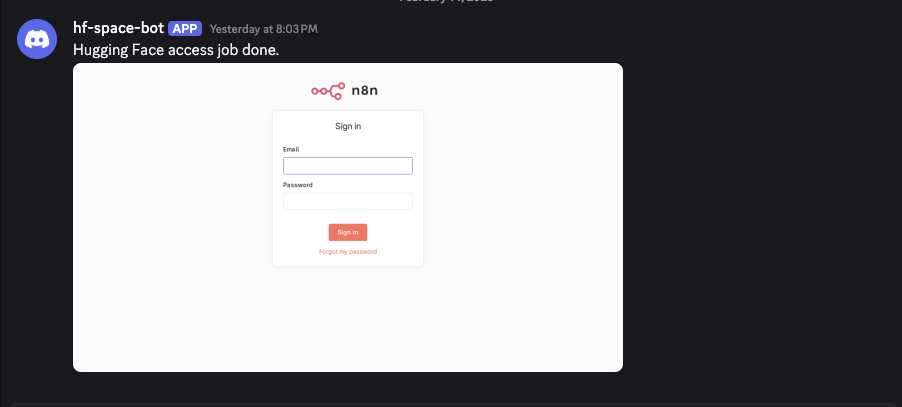
GitHub Actions accesses my Space daily agent-browser opens the page and takes a screenshot The screenshot is posted to Discord
This achieves both: • ✅ Preventing sleep • ✅ Visual uptime monitoring
In this article, I’ll show you exactly how to set it up.
⸻
Why use agent-browser?
You could simply curl the Space URL.
But I wanted: • A real browser access (not just HTTP ping) • To confirm the page fully renders • To capture a screenshot as proof • To visually verify that nothing is broken
For that, I used agent-browser, a CLI browser automation tool built on Playwright.
It works perfectly inside GitHub Actions.
agent-browser https://github.com/vercel-labs/agent-browser
⸻
The GitHub Actions Workflow
Here is the exact YAML file I use:
on:
  schedule:
    - cron: "0 0 * * *"

jobs:
  access-hugging-face-n8n:
    runs-on: ubuntu-latest
    steps:
      - uses: actions/checkout@v6

      - name: Install agent-browser
        run: npm install -g agent-browser

      - name: Install Playwright browsers
        run: agent-browser install --with-deps

      - name: Go to the hugging face space
        run: |
          agent-browser open ${{ secrets.HUGGING_FACE_SPACE_URL }}
          agent-browser wait --text "Sign in"
          agent-browser screenshot page.png
          agent-browser close

      - name: Notify Discord on done access
        if: success()
        run: |
          curl --fail-with-body -sS -X POST \
            -F 'payload_json={"content":"Hugging Face access job done."}' \
            -F "file1=@page.png;type=image/png" \
            "${{ secrets.DISCORD_WEBHOOK_URL }}"
⸻
How It Works
- Scheduled Daily Run
cron: “0 0 * * *”
This runs once per day at 00:00 UTC.
⸻
- Install agent-browser
npm install -g agent-browser agent-browser install —with-deps
This installs Playwright and required browser dependencies inside the GitHub Actions runner.
⸻
- Open the Hugging Face Space
agent-browser open ${{ secrets.HUGGING_FACE_SPACE_URL }} agent-browser wait —text “Sign in” agent-browser screenshot page.png agent-browser close
What this does: 1. Opens the Space in a real browser 2. Waits until “Sign in” text appears (ensures full render) 3. Takes a screenshot 4. Closes the browser
The wait —text step prevents taking screenshots before the page is fully loaded.
You can change the text to something more specific to your app.
⸻
- Post Screenshot to Discord
curl -X POST
-F ‘payload_json={“content”:“Hugging Face access job done.”}’
-F “file1=@page.png;type=image/png”
”${{ secrets.DISCORD_WEBHOOK_URL }}”
This sends: • A success message • The screenshot image
to your Discord channel via webhook.
Now you have both: • Sleep prevention • Daily visual health check
⸻
Setting Up Secrets
In your GitHub repository:
Settings → Secrets and variables → Actions
Add: • HUGGING_FACE_SPACE_URL • DISCORD_WEBHOOK_URL
These are securely injected into the workflow using:
${{ secrets.SECRET_NAME }}
⸻
Why This Approach Is Nice
✅ Free to run
GitHub Actions free tier is sufficient.
✅ No server required
No EC2, no cron server, no maintenance.
✅ Real browser check
Not just ping — full rendering validation.
✅ Visual confirmation
You instantly see if something broke.
✅ Easy to extend
Add monitoring, metrics, multi-Space support.
⸻
Optional Improvements
You could extend this further: • Fail the job if specific text is missing • Measure page load time • Upload screenshots to S3 / R2 • Monitor multiple Spaces in parallel • Add Slack notifications • Store screenshots as GitHub Action artifacts
You can even turn this into a lightweight uptime monitoring system.
⸻
Conclusion
Hugging Face Spaces going to sleep can be inconvenient.
But with:
GitHub Actions + agent-browser
you can: • Automatically keep your Space awake • Capture daily screenshots • Get notified via Discord • Monitor visual health
All without running your own server.
Simple, effective, and fully automated.