How to Run Clawdbot Locally and Control It from Discord
Clawdbot
Clears your inbox, sends emails, manages your calendar, checks you in for flights. All from WhatsApp, Telegram, or any chat app you already use.
Docs https://docs.clawd.bot/start/getting-started
Supported platforms
- Telegram
- Discord
- Slack
- Signal
- iMessage
- Claude
- GPT
- Spotify
- Hue
- Obsidian
- Browser
- Gmail
- GitHub
Install Clawdbot
requirements
- Nodejs v22+
pnpm(recommended) Unfortunately,bunis not recommended
Step 1: Install Nodejs
# Download and install nvm:
curl -o- https://raw.githubusercontent.com/nvm-sh/nvm/v0.40.3/install.sh | bash

# in lieu of restarting the shell
\. "$HOME/.nvm/nvm.sh"

# Download and install Node.js:
nvm install 25

# Verify the Node.js version:
node -v # Should print "v25.4.0".

# Install Corepack:
npm install -g corepack

# Download and install pnpm:
corepack enable pnpm

# Verify pnpm version:
pnpm -v
https://nodejs.org/en/download/current
mise install nodejs 22.22.0
Step 2: Install Clawdbod
curl -fsSL https://clawd.bot/install.sh | bash

# version check
clawdbot -v
2026.1.23-1
Step 3: Generate a Discord bot token
Go to https://discord.com/developers/applications and create a new application. In this post, I name Clawdbot.
Go to Bot section in the sidebar and turn on the following
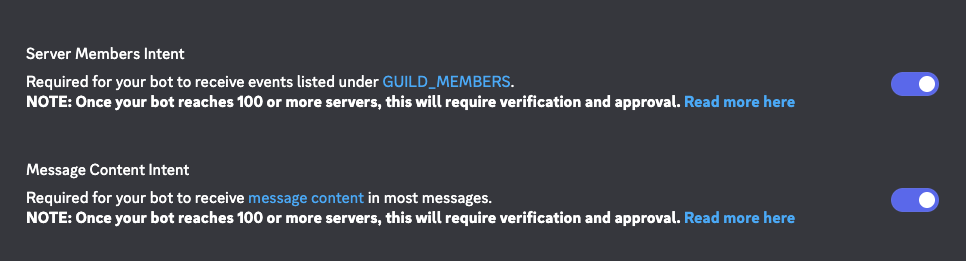 .
Then click
.
Then click Reset Token, and you can get a bot token. You will need to copy the token for onboarding.
Then go to OAuth2,
Step 4: Clawdbot onboarding
clawdbot onboard --install-daemon

🦞 Clawdbot 2026.1.23-1 (c8afa82)
   It's not "failing," it's "discovering new ways to configure the same thing wrong."

░████░█░░░░░█████░█░░░█░███░░████░░████░░▀█▀
█░░░░░█░░░░░█░░░█░█░█░█░█░░█░█░░░█░█░░░█░░█░
█░░░░░█░░░░░█████░█░█░█░█░░█░████░░█░░░█░░█░
█░░░░░█░░░░░█░░░█░█░█░█░█░░█░█░░█░░█░░░█░░█░
░████░█████░█░░░█░░█░█░░███░░████░░░███░░░█░
              🦞 FRESH DAILY 🦞
┌  Clawdbot onboarding
│
◇  Security ──────────────────────────────────────────────╮
│                                                         │
│  Please read: https://docs.clawd.bot/security           │
│                                                         │
│  Clawdbot agents can run commands, read/write files,    │
│  and act through any tools you enable. They can only    │
│  send messages on channels you configure (for example,  │
│  an account you log in on this machine, or a bot        │
│  account like Slack/Discord).                           │
│                                                         │
│  If you’re new to this, start with the sandbox and      │
│  least privilege. It helps limit what an agent can do   │
│  if it’s tricked or makes a mistake.                    │
│  Learn more: https://docs.clawd.bot/sandboxing          │
│                                                         │
├─────────────────────────────────────────────────────────╯
│
◇  I understand this is powerful and inherently risky.
Continue?
│  Yes
│
◇  Onboarding mode
│  QuickStart
│
◇  QuickStart ─────────────────────────╮
│                                      │
│  Gateway port: 18789                 │
│  Gateway bind: Loopback (127.0.0.1)  │
│  Gateway auth: Token (default)       │
│  Tailscale exposure: Off             │
│  Direct to chat channels.            │
│                                      │
├──────────────────────────────────────╯
│
◇  Model/auth provider
│  OpenAI
│
◇  OpenAI auth method
│  OpenAI Codex OAuth (Codex CLI)
│
◇  Model configured ──────────────────────────╮
│                                             │
│  Default model set to openai-codex/gpt-5.2  │
│                                             │
├─────────────────────────────────────────────╯
│
◇  Default model
│  Keep current (openai-codex/gpt-5.2)
│
◇  Channel status ────────────────────────────╮
│                                             │
│  Telegram: not configured                   │
│  WhatsApp: not configured                   │
│  Discord: not configured                    │
│  Slack: not configured                      │
│  Signal: not configured                     │
│  iMessage: not configured                   │
│  Nostr: install plugin to enable            │
│  Microsoft Teams: install plugin to enable  │
│  Mattermost: install plugin to enable       │
│  Nextcloud Talk: install plugin to enable   │
│  Matrix: install plugin to enable           │
│  BlueBubbles: install plugin to enable      │
│  Zalo: install plugin to enable             │
│  Zalo Personal: install plugin to enable    │
│  Tlon: install plugin to enable             │
│                                             │
├─────────────────────────────────────────────╯
│
◇  How channels work ─────────────────────────────────────╮
│                                                         │
│  DM security: default is pairing; unknown DMs get a     │
│  pairing code.                                          │
│  Approve with: clawdbot pairing approve <channel>       │
│  <code>                                                 │
│  Public DMs require dmPolicy="open" + allowFrom=["*"].  │
│  Multi-user DMs: set                                    │
│  session.dmScope="per-channel-peer" to isolate          │
│  sessions.                                              │
│  Docs:                                                  │
│  start/pairi                                            │
│  ng                                                     │
│                                                         │
│  Telegram: simplest way to get started — register a     │
│  bot with @BotFather and get going.                     │
│  WhatsApp: works with your own number; recommend a      │
│  separate phone + eSIM.                                 │
│  Discord: very well supported right now.                │
│  Slack: supported (Socket Mode).                        │
│  Signal: signal-cli linked device; more setup (David    │
│  Reagans: "Hop on Discord.").                           │
│  iMessage: this is still a work in progress.            │
│  Nostr: Decentralized protocol; encrypted DMs via       │
│  NIP-04.                                                │
│  Microsoft Teams: Bot Framework; enterprise support.    │
│  Mattermost: self-hosted Slack-style chat; install the  │
│  plugin to enable.                                      │
│  Nextcloud Talk: Self-hosted chat via Nextcloud Talk    │
│  webhook bots.                                          │
│  Matrix: open protocol; install the plugin to enable.   │
│  BlueBubbles: iMessage via the BlueBubbles mac app +    │
│  REST API.                                              │
│  Zalo: Vietnam-focused messaging platform with Bot      │
│  API.                                                   │
│  Zalo Personal: Zalo personal account via QR code       │
│  login.                                                 │
│  Tlon: decentralized messaging on Urbit; install the    │
│  plugin to enable.                                      │
│                                                         │
├─────────────────────────────────────────────────────────╯
│
◇  Select channel (QuickStart)
│  Discord (Bot API)
│
◇  Discord bot token ───────────────────────────────────╮
│                                                       │
│  1) Discord Developer Portal → Applications → New     │
│  Application                                          │
│  2) Bot → Add Bot → Reset Token → copy token          │
│  3) OAuth2 → URL Generator → scope 'bot' → invite to  │
│  your server                                          │
│  Tip: enable Message Content Intent if you need       │
│  message text. (Bot → Privileged Gateway Intents →    │
│  Message Content Intent)                              │
│  Docs:                                                │
│  discord                                              │
│                                                       │
├───────────────────────────────────────────────────────╯
03:41:11 [agents/auth-profiles] synced openai-codex credentials from codex cli
│
◇  Enter Discord bot token
│  <Discord bot token>
│
◇  Configure Discord channels access?
│  Yes
│
◇  Discord channels access
│  Open (allow all channels)
│
◇  Selected channels ──────────────────────────────╮
│                                                  │
│  Discord — very well supported right now. Docs:  │
│  discord                                        │
│  ]8;;                                           │
│                                                  │
├──────────────────────────────────────────────────╯
Updated ~/.clawdbot/clawdbot.json
Workspace OK: ~/clawd
Sessions OK: ~/.clawdbot/agents/main/sessions
│
◇  Skills status ────────────╮
│                            │
│  Eligible: 10              │
│  Missing requirements: 39  │
│  Blocked by allowlist: 0   │
│                            │
├────────────────────────────╯
│
◇  Configure skills now? (recommended)
│  Yes
│
◇  Preferred node manager for skill installs
│  npm
│
◇  Install missing skill dependencies
│  Skip for now
│
◇  Set GOOGLE_PLACES_API_KEY for goplaces?
│  No
│
◇  Set GOOGLE_PLACES_API_KEY for local-places?
│  No
│
◇  Set GEMINI_API_KEY for nano-banana-pro?
│  No
│
◇  Set OPENAI_API_KEY for openai-image-gen?
│  No
│
◇  Set OPENAI_API_KEY for openai-whisper-api?
│  No
│
◇  Set ELEVENLABS_API_KEY for sag?
│  No
│
◇  Hooks ──────────────────────────────────────────────╮
│                                                      │
│  Hooks let you automate actions when agent commands  │
│  are issued.                                         │
│  Example: Save session context to memory when you    │
│  issue /new.                                         │
│                                                      │
│  Learn more: https://docs.clawd.bot/hooks            │
│                                                      │
├──────────────────────────────────────────────────────╯
│
◇  Enable hooks?
│  Skip for now
│
◇  Gateway service runtime ──────────────────────────────╮
│                                                        │
│  QuickStart uses Node for the Gateway service (stable  │
│  + supported).                                         │
│                                                        │
├────────────────────────────────────────────────────────╯
│
◑  Installing Gateway service…
Installed LaunchAgent: /Users/koji/Library/LaunchAgents/com.clawdbot.gateway.plist
Logs: /Users/koji/.clawdbot/logs/gateway.log
◇  Gateway service installed
│
◇
Health check failed: gateway closed (1006 abnormal closure (no close frame)): no close reason
  Gateway target: ws://127.0.0.1:18789
  Source: local loopback
  Config: /Users/koji/.clawdbot/clawdbot.json
  Bind: loopback
│
◇  Health check help ──────────────────────────────╮
│                                                  │
│  Docs:                                           │
│  https://docs.clawd.bot/gateway/health           │
│  https://docs.clawd.bot/gateway/troubleshooting  │
│                                                  │
├──────────────────────────────────────────────────╯
Missing Control UI assets. Build them with `pnpm ui:build` (auto-installs UI deps).
│
◇  Optional apps ────────────────────────╮
│                                        │
│  Add nodes for extra features:         │
│  - macOS app (system + notifications)  │
│  - iOS app (camera/canvas)             │
│  - Android app (camera/canvas)         │
│                                        │
├────────────────────────────────────────╯
│
◇  Control UI ────────────────────────────────────────────╮
│                                                         │
│  Web UI: http://127.0.0.1:18789/                        │
│  Web UI (with token):                                   │
│  http://127.0.0.1:18789/?token=2da11cb64b3563eeac74c45  │
│  f555882108610c614ce69d2db                              │
│  Gateway WS: ws://127.0.0.1:18789                       │
│  Gateway: not detected (gateway closed (1006 abnormal   │
│  closure (no close frame)): no close reason)            │
│  Docs: https://docs.clawd.bot/web/control-ui            │
│                                                         │
├─────────────────────────────────────────────────────────╯
│
◇  Workspace backup ──────────────────────────────────────╮
│                                                         │
│  Back up your agent workspace.                          │
│  Docs: https://docs.clawd.bot/concepts/agent-workspace  │
│                                                         │
├─────────────────────────────────────────────────────────╯
│
◇  Security ──────────────────────────────────────────╮
│                                                     │
│  Running agents on your computer is risky — harden  │
│  your setup: https://docs.clawd.bot/security        │
│                                                     │
├─────────────────────────────────────────────────────╯
│
◇  Dashboard ready ───────────────────────────────────────╮
│                                                         │
│  Dashboard link (with token):                           │
│  http://127.0.0.1:18789/?token=2da11cb64b3563eeac74c45  │
│  f555882108610c614ce69d2db                              │
│  Opened in your browser. Keep that tab to control       │
│  Clawdbot.                                              │
│                                                         │
├─────────────────────────────────────────────────────────╯
│
◇  Web search (optional) ─────────────────────────────────╮
│                                                         │
│  If you want your agent to be able to search the web,   │
│  you’ll need an API key.                                │
│                                                         │
│  Clawdbot uses Brave Search for the `web_search` tool.  │
│  Without a Brave Search API key, web search won’t       │
│  work.                                                  │
│                                                         │
│  Set it up interactively:                               │
│  - Run: clawdbot configure --section web                │
│  - Enable web_search and paste your Brave Search API    │
│    key                                                  │
│                                                         │
│  Alternative: set BRAVE_API_KEY in the Gateway          │
│  environment (no config changes).                       │
│  Docs: https://docs.clawd.bot/tools/web                 │
│                                                         │
├─────────────────────────────────────────────────────────╯
│
◇  What now ───────────────────────────────────────────╮
│                                                      │
│  What now: https://clawd.bot/showcase ("What People  │
│  Are Building").                                     │
│                                                      │
├──────────────────────────────────────────────────────╯
│
└  Onboarding complete. Dashboard opened with your token; keep that tab to control Clawdbot.
Step 5: Check Clawdbot gateway status
clawdbot gateway status

🦞 Clawdbot 2026.1.23-1 (c8afa82)
   If it works, it's automation; if it breaks, it's a "learning opportunity."

│
◇
Service: LaunchAgent (loaded)
File logs: /tmp/clawdbot/clawdbot-2026-01-25.log
Command: /usr/local/bin/node /Users/koji/.npm-global/lib/node_modules/clawdbot/dist/entry.js gateway --port 18789
Service file: ~/Library/LaunchAgents/com.clawdbot.gateway.plist
Service env: CLAWDBOT_GATEWAY_PORT=18789

Config (cli): ~/.clawdbot/clawdbot.json
Config (service): ~/.clawdbot/clawdbot.json

Gateway: bind=loopback (127.0.0.1), port=18789 (service args)
Probe target: ws://127.0.0.1:18789
Dashboard: http://127.0.0.1:18789/
Probe note: Loopback-only gateway; only local clients can connect.

Runtime: running (pid 54025, state active)
RPC probe: ok

Listening: 127.0.0.1:18789
Troubles: run clawdbot status
Troubleshooting: https://docs.clawd.bot/troubleshooting
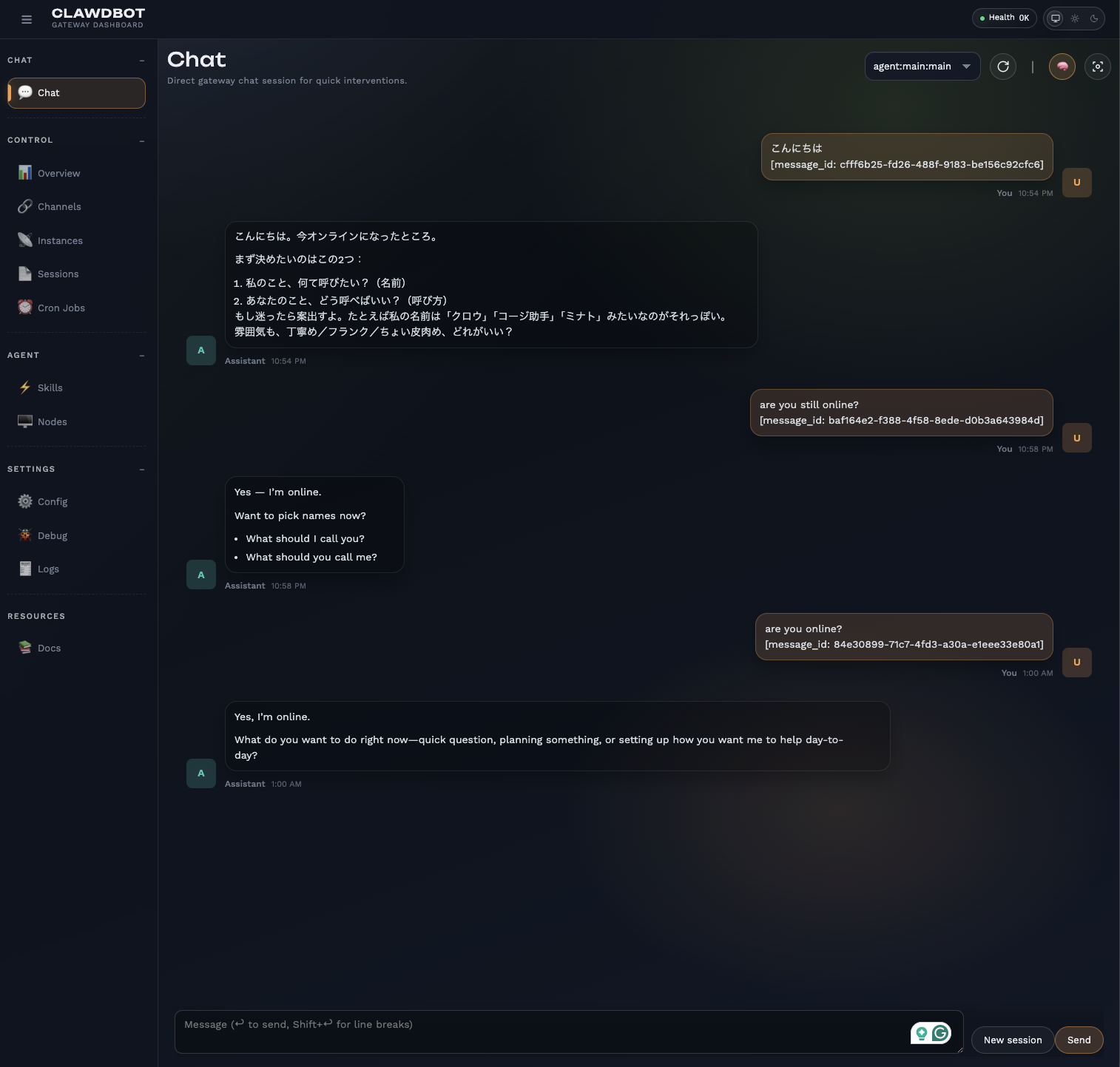
If everything works and you have access to http://127.0.0.1:18789/, you will see the following.
Step 6: Send a message to Clawdbot
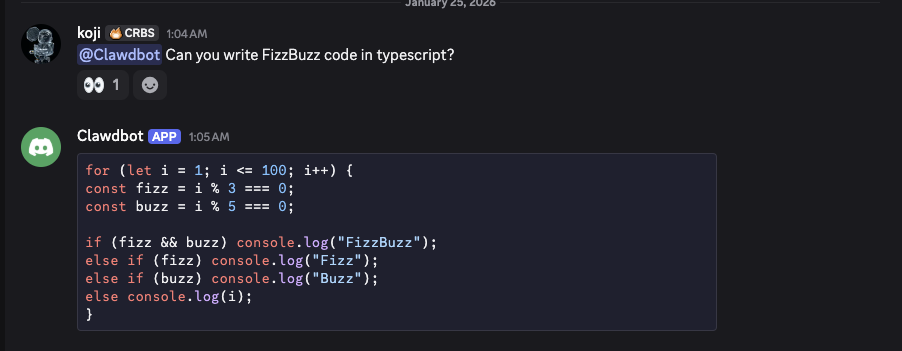
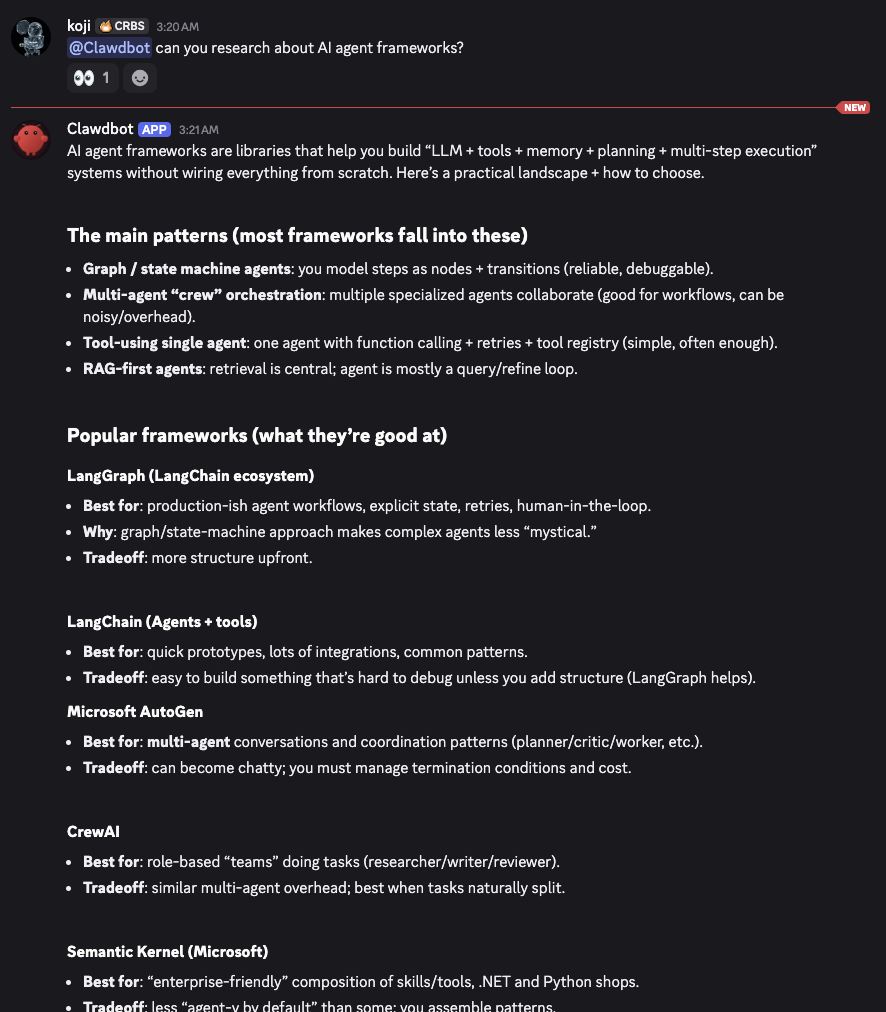
Now, it’s time to send a message to the bot on Discord.
Step 7: Use TUI (Terminal UI)
clawdbot tui


 hello

 Hello.

 If you tell me one thing you want help with today, I’ll take
 it from there.
 Also: what should I call you?
 connected | idle
 agent main | session main (clawdbot-tui) |
 openai-codex/gpt-5.2 | tokens 9.4k/400k (2%)